
ServiceNow Ticket Actions
ServiceNow integration enables automated incident ticket creation in ServiceNow when Hydden Discovery events occur. Use ServiceNow workflows to create tickets for threat detection, collection failures, data validation issues, and classification changes.
Overview
ServiceNow providers connect to your ServiceNow instance's Table API to automatically create incident tickets. Each workflow can create tickets with:
- Short Description: Brief ticket title with template variables
- Description: Detailed ticket body with event context
- Automatic Creation: Tickets created immediately when events occur
- Template Variables: Dynamic content from trigger events
Prerequisites
Before configuring ServiceNow integration:
- ServiceNow Instance: An active ServiceNow instance with the Incident Management module
- ServiceNow Credential: A ServiceNow user account with incident creation permissions
- Network Access: Hydden Discovery must be able to reach your ServiceNow instance endpoint
- Account Type: ServiceNow account should be marked as Web Service Access Only for API access
- Permissions: The ServiceNow user must have the
itilrole or equivalent permissions to create incidents
NOTE
For ServiceNow incident management creation, the ServiceNow account should be marked as a Web Service Access Only account. Custom roles are not required, but the account must have permission to POST to /api/now/table/incident.
Creating a ServiceNow Provider
To add a ServiceNow provider:
- In Hydden, navigate to Configuration > Automate.
- On the Providers tab, click + Add New.
- From the Type drop-down, select ServiceNow.
- For Name, enter a descriptive provider name (e.g., "ServiceNow Production", "SNOW Dev Instance").
- For Description, provide an optional description of the provider's purpose.
- For Endpoint, enter your ServiceNow instance URL:
- Format:
https://[instance-name].service-now.com - Example:
https://dev12345.service-now.com - Do NOT include the API path - only the base instance URL
- Format:
- From the Credential drop-down, select a pre-configured ServiceNow credential containing:
- Username: ServiceNow user account (Web Service Access Only recommended)
- Password: ServiceNow user password
- Create the credential in Configuration > Settings > Credentials before adding the provider
- Click Save.
ServiceNow Endpoint Format
The endpoint should be your ServiceNow instance base URL:
- Correct:
https://instance.service-now.com - Correct:
https://dev12345.service-now.com - Incorrect:
https://instance.service-now.com/api/now/table/incident(do not include API path) - Incorrect:
http://instance.service-now.com(use HTTPS, not HTTP)
Hydden Discovery automatically appends /api/now/table/incident to the endpoint when creating tickets.
Creating a ServiceNow Workflow
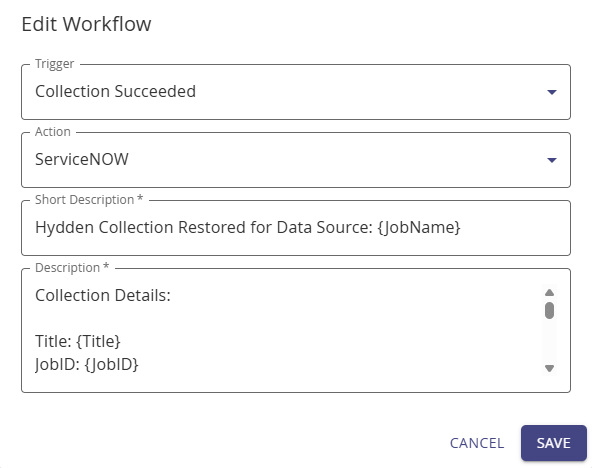
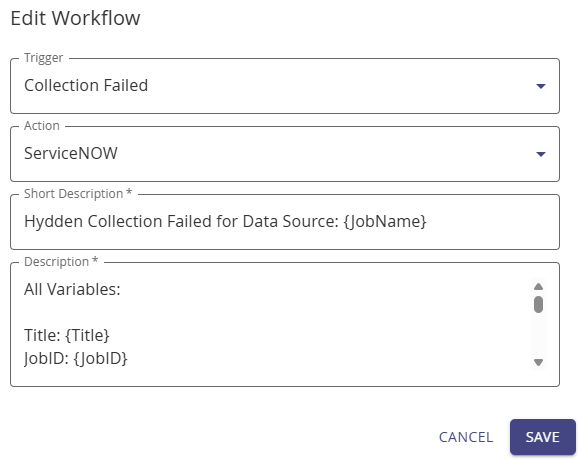
To create a ServiceNow workflow:
- Navigate to Configuration > Automate.
- On the Workflow tab, select + Add New.
- For Name, enter a descriptive workflow name (e.g., "Create Ticket for High-Risk Threats").
- For Description, provide an optional workflow purpose description.
- From the Trigger drop-down, select the event that should create tickets:
- Threat Detected: Create tickets when threats are detected
- Collection Failed: Create tickets when data source collections fail
- Data Validation Failed: Create tickets when data validation fails
- Classification Added: Create tickets when specific classifications are applied
- Other available triggers (see Triggers for complete list)
- From the Action drop-down, select your configured ServiceNow provider.
- For Short Description, provide a brief ticket title:
- Supports template variables (e.g.,
Threat Detected: {ThreatName}) - Keep concise (under 150 characters recommended)
- This becomes the ServiceNow incident
short_descriptionfield - Variables auto-display when you type
{in the field
- Supports template variables (e.g.,
- For Description, provide detailed ticket content:
- Supports template variables for event details
- Include relevant context and remediation guidance
- This becomes the ServiceNow incident
descriptionfield - See Triggers for available variables by trigger type
- (Optional) Configure filter options to scope the workflow (see Workflows)
- Click Save.
- Toggle the workflow switch to on to activate it.
NOTE
A collection must be run successfully at least once before actions can be triggered.
ServiceNow API Integration
API Endpoint
Hydden Discovery uses the ServiceNow Table API to create incidents:
- Full Endpoint:
{endpoint}/api/now/table/incident - HTTP Method: POST
- Authentication: HTTP Basic Auth
- Content-Type:
application/json - Accept:
application/json
Request Payload
Hydden Discovery sends the following JSON payload to ServiceNow:
{
  "short_description": "Rendered short description with variables",
  "description": "Rendered description with variables and details"
}
ServiceNow automatically populates other incident fields with default values:
- State: New (1)
- Impact: 3 - Low (default)
- Urgency: 3 - Low (default)
- Priority: 5 - Planning (calculated from Impact and Urgency)
- Caller: The authenticated ServiceNow user
- Assignment Group: None (can be set via Business Rules in ServiceNow)
Authentication
ServiceNow workflows use HTTP Basic Authentication:
- Username: From configured credential
- Password: From configured credential
- Header:
Authorization: Basic <base64(username:password)>
The credential is retrieved from Hydden Discovery's credential vault using the provider's credential_id and credential_type.
Response Handling
- Success: HTTP 200 or 201 status code indicates successful incident creation
- Failure: Any other status code is logged as an error
- No Retry: ServiceNow integration does not automatically retry failed requests (to avoid duplicate tickets)
Template Variables
ServiceNow workflows support all template variables available for the selected trigger type. Use {VariableName} syntax to include dynamic event data.
Example Templates
Threat Detection Ticket:
Short Description: SECURITY ALERT: {ThreatName} detected on {Platform}
Description:
Threat Name: {ThreatName}
Threat ID: {ThreatID}
Platform: {Platform}
Affected Accounts: {Accounts}
Risk Score: {Score}
Site: {Site}
Detection Time: {JobTime}

Action Required:
1. Review affected accounts: {Names}
2. Investigate threat details in Hydden Discovery
3. Remediate identified risks
4. Update ticket status when resolved
Collection Failure Ticket:
Short Description: DATA COLLECTION FAILED: {JobName} on {Platform}
Description:
Collection Job: {JobName}
Platform: {Platform}
Site: {Site}
Error Message: {JobError}
Job ID: {JobID}
Last Successful Run: {LastRun}

Action Required:
1. Review error message and identify root cause
2. Verify data source credentials and connectivity
3. Retry collection after resolving issue
4. Monitor for successful completion
Data Validation Failure Ticket:
Short Description: DATA QUALITY ISSUE: {JobName} validation failed
Description:
Validation Job: {JobName}
Platform: {Platform}
Site: {Site}
Error: {JobError}
Job ID: {JobID}

Action Required:
1. Review data quality error details
2. Check data source configuration
3. Validate data schema requirements
4. Re-run validation after corrections
See Triggers for complete variable lists by trigger type.
ServiceNow Configuration Best Practices
ServiceNow User Configuration
Create Dedicated Integration User:
- Username:
hydden_integrationor similar - Mark as "Web Service Access Only"
- Assign
itilrole (or equivalent permissions for incident creation) - Use a strong, unique password
- Username:
Service Account Security:
- Store credentials in Hydden Discovery credential vault
- Rotate passwords periodically
- Monitor user activity in ServiceNow audit logs
- Restrict user permissions to minimum required (incident creation only)
ServiceNow Business Rules
Configure ServiceNow Business Rules to enhance ticket creation:
Auto-Assignment: Automatically assign tickets to appropriate groups based on:
- Short description keywords (e.g., "SECURITY ALERT" → Security Operations)
- Custom fields populated by Hydden
- Urgency and impact calculations
Priority Calculation: Adjust priority based on:
- Threat risk scores from Hydden
- Platform criticality
- Business impact
Notification: Send notifications to:
- Assigned groups
- Managers
- Security operations center (SOC)
Custom Fields: Populate custom fields with:
- Hydden threat IDs
- Platform identifiers
- Risk scores
- Direct links back to Hydden Discovery
ServiceNow Incident Template
Consider creating a custom incident template in ServiceNow for Hydden Discovery tickets:
- Category: Security / Data Management
- Subcategory: Threat Detection / Collection Issue
- Configuration Item: Link to relevant CI in CMDB
- Custom Fields: Add fields for Hydden-specific data (threat ID, risk score, etc.)
Common Use Cases
Security Operations
High-Risk Threat Tickets:
Name: Create Ticket for Critical Threats
Trigger: Threat Detected
Filter: threatid: critical-threats
Action: ServiceNow Production
Short Description: 🚨 CRITICAL THREAT: {ThreatName} on {Platform}
Description: [Detailed threat information with remediation steps]
Threat Resolution Tracking:
Name: Update Ticket on Threat Resolution
Trigger: Threat Resolved
Action: ServiceNow Production (with custom integration to update existing ticket)
Operations Monitoring
Collection Failure Alerts:
Name: Collection Failure Ticket
Trigger: Collection Failed
Action: ServiceNow Production
Short Description: Collection Failed: {JobName} on {Platform}
Description: [Error details and troubleshooting steps]
Data Quality Issues:
Name: Data Validation Failure Ticket
Trigger: Data Validation Failed
Action: ServiceNow Production
Short Description: Data Quality Issue: {JobName}
Description: [Validation error details]
Compliance & Audit
Privileged Account Discovery:
Name: New Privileged Account Alert
Trigger: Classification Added
Filter: classificationid: privileged-account
Action: ServiceNow Production
Short Description: New Privileged Account Discovered: {Name}
Description: [Account details and compliance review requirements]
Troubleshooting
| Issue | Solution |
|---|---|
| Tickets not created | Verify workflow is enabled, check ServiceNow provider configuration, confirm credentials are valid |
| Authentication failure | Verify ServiceNow username and password, check user is marked as "Web Service Access Only", confirm user has itil role |
| 403 Forbidden error | Verify ServiceNow user has permission to create incidents, check ACL rules in ServiceNow |
| 404 Not Found error | Verify endpoint URL is correct (base instance URL, not full API path), check ServiceNow instance is accessible |
| Connection timeout | Check network connectivity to ServiceNow instance, verify firewall rules, confirm endpoint URL uses HTTPS |
| Duplicate tickets | ServiceNow workflows do not have built-in deduplication - implement Business Rules in ServiceNow to prevent duplicates |
| Variables not substituting | Verify variable names match trigger type (see Triggers), check syntax uses {Variable} format |
| Wrong incident fields | ServiceNow uses default values for fields not specified in payload - configure Business Rules to populate additional fields |
Advanced Integration
Updating Existing Tickets
To update existing ServiceNow tickets instead of creating new ones:
- Configure a custom webhook integration instead of ServiceNow provider
- Use ServiceNow Table API to query for existing tickets
- Update tickets using PATCH method to
/api/now/table/incident/{sys_id} - Include logic to match Hydden events to ServiceNow ticket numbers
Custom Field Population
To populate custom fields in ServiceNow incidents:
- Modify the ServiceNow incident table to include custom fields
- Use ServiceNow Business Rules to extract data from description field
- Parse structured data from Hydden ticket descriptions
- Populate custom fields based on extracted data
Alternatively, use webhook integration for full control over payload structure.
CMDB Integration
Link Hydden Discovery tickets to ServiceNow CMDB:
- Map Hydden platforms/systems to ServiceNow Configuration Items (CIs)
- Include CI sys_id in ticket description or use Business Rules
- Automatically link incidents to affected CIs
- Enable impact analysis based on CI relationships
Related Topics
- Overview - Automation architecture and concepts
- Workflows - Creating and managing workflows
- Triggers - Available trigger types and variables
- Providers - Configuring email providers
- Using Webhooks - Webhook integration (alternative to ServiceNow provider for advanced scenarios)
- Add to Vault - PAM integration for auto-vaulting
- Credentials - Managing credentials for providers
- Threat Detection Rules - Configuring threat detection