
Default Threat Rules
This article provides an overview of the default threat detection rules available to all Hydden customers. Rules are organized by category, with each category contributing up to 10 points to the total threat score.
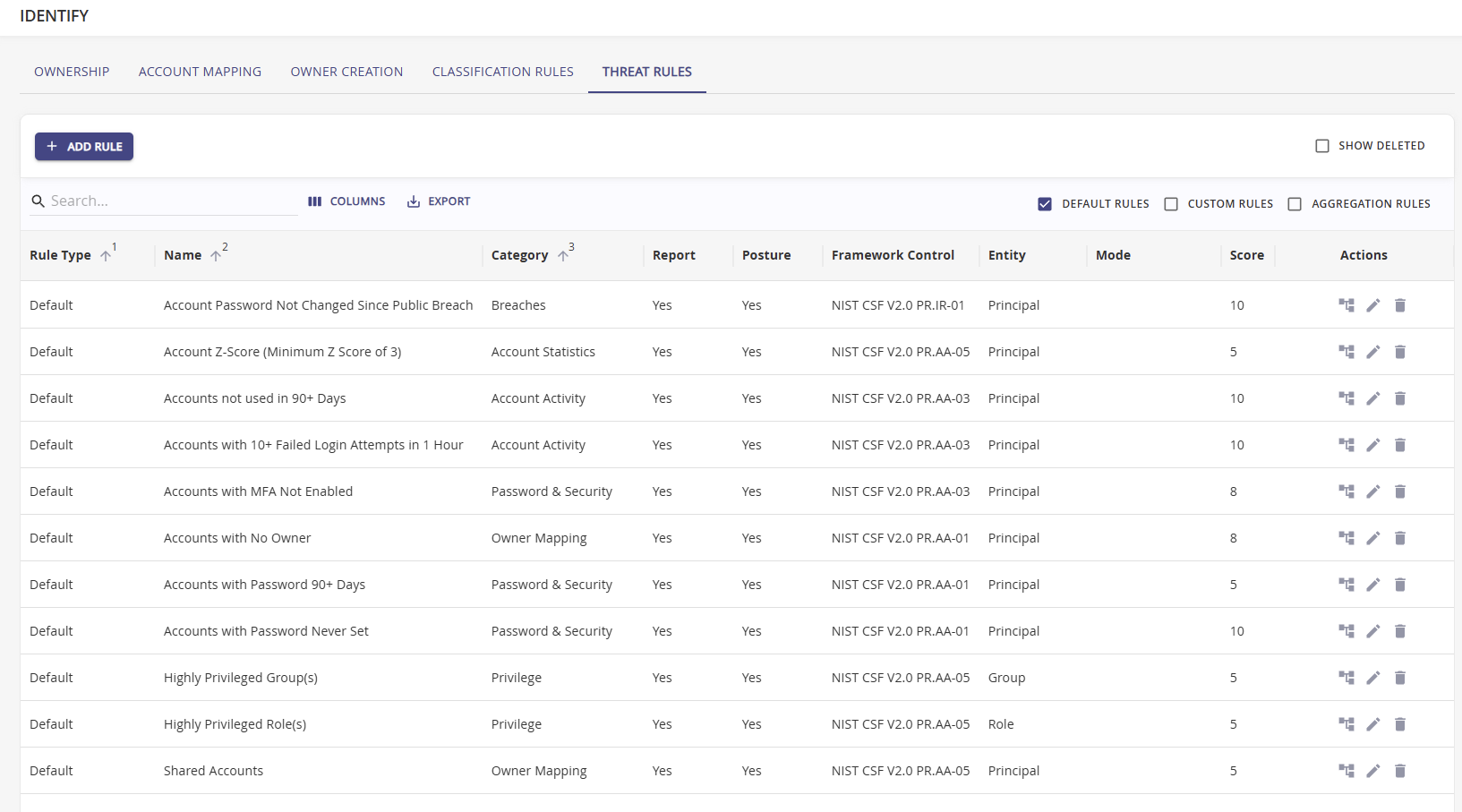
Each rule can be specified to be shown in Reports or Posture. By default both options are checked on all default threat rules.
Privilege
| Name | Description | Score | Default State | Detection Only | Framework |
|---|---|---|---|---|---|
| Highly Privileged Group(s) | Groups for which privileges have not been trimmed. | 5 | Enabled | No | — |
| Highly Privileged Role(s) | Roles for which privileges have not been trimmed. | 5 | Enabled | No | — |
| All Privileged Groups | Flags all accounts that are members of any privileged group. | 10 | Enabled | Yes | — |
| Privileged Accounts Not Vaulted | Privileged accounts that are not managed by a vault solution. | 10 | Enabled | No | — |
Password & Security
| Name | Description | Threshold | Score | Default State | Detection Only | Framework |
|---|---|---|---|---|---|---|
| Accounts with MFA Not Enabled | Accounts for which MFA has not been enabled. | — | 8 | Enabled | No | — |
| Accounts with Password Never Set | Accounts for which a password was never set up. | — | 10 | Enabled | No | — |
| Accounts with Password 90+ Days | Accounts with a password age of 90 or more days. | 90+ | 5 | Enabled | No | — |
| Accounts with Password 180+ Days | Accounts with a password age of 180 or more days. | 180+ | 4 | Enabled | Yes | — |
| Accounts with Password 365+ Days | Accounts with a password age of 365 or more days. | 365+ | 4 | Enabled | Yes | — |
Account Activity
| Name | Description | Threshold | Score | Default State | Detection Only | Framework |
|---|---|---|---|---|---|---|
| Accounts not used in 90+ Days | Flags all accounts that have been stale for 90+ days. | 90+ days | 10 | Enabled | No | — |
| Accounts not used in 180+ Days | Flags all accounts that have been stale for 180+ days. | 180+ days | 3 | Enabled | Yes | — |
| Accounts not used in 275+ Days | Flags all accounts that have been stale for 275+ days. | 275+ days | 4 | Disabled | No | — |
| Accounts not used in 365+ Days | Flags all accounts that have been stale for 365+ days. | 365+ days | 5 | Enabled | Yes | — |
| Accounts with 10+ Failed Login Attempts in 1 Hour | Flags accounts with more than 10 failed login attempts in one hour. | 10+ | 10 | Enabled | No | — |
| Accounts with 5+ Failed Login Attempts | Flags accounts with more than 5 failed login attempts. | 5+ | 6 | Disabled | No | — |
| Accounts with 20+ Failed Login Attempts | Flags accounts with more than 20 failed login attempts. | 20+ | 8 | Disabled | No | — |
| Accounts with 25+ Failed Login Attempts | Flags accounts with more than 25 failed login attempts. | 25+ | 9 | Disabled | No | — |
Breaches
| Name | Description | Score | Default State | Detection Only | Framework |
|---|---|---|---|---|---|
| Account Password Not Changed Since Public Breach | Flags accounts identified in a breach where the password change date is unknown or older than the breach date. | 10 | Enabled | No | — |
| Breached Account(s) | Flags accounts identified in a public data breach. | 10 | Enabled | Yes | — |
Group Membership
| Name | Description | Threshold | Score | Default State | Detection Only | Framework |
|---|---|---|---|---|---|---|
| Group(s) 500+ | Detects accounts with memberships in excessively large groups. | 500+ | 2 | Disabled | No | — |
| Account Group Deviation (Z-Score) | Identifies accounts with group membership outside the standard distribution. See Z-Score. | — | 5 | Enabled | No | NIST CSF V2.0 / PR.AA-05 |
Owner Mapping
| Name | Description | Score | Default State | Detection Only | Framework |
|---|---|---|---|---|---|
| Accounts with No Owner | Alerts to accounts without owner designation. | 8 | Enabled | No | — |
| Shared Account | Alerts to an account that is shared with another user. | 5 | Enabled | No | — |
| Shared Account+ | Alerts to an account that is shared with more than one other user (3+ owners). | 10 | Disabled | No | — |
| Inactive Owners With Enabled Accounts | Flags accounts mapped to inactive owners that remain enabled. | 10 | Enabled | Yes | — |
Special Rules
| Name | Description | Score | Default State | Detection Only | Alert | Repeatable | Framework |
|---|---|---|---|---|---|---|---|
| CyberArk Onboarding | Detects privileged accounts eligible for CyberArk vault onboarding. | 10 | Disabled | Yes | Yes | Yes | — |
Default Aggregation Rules
Aggregation rules combine matched threat rules into category totals and a final account-level threat score.
| Category | Name | Description | Max Score |
|---|---|---|---|
| Total Calculation | Account Activity (Total) | Aggregates all Account Activity rule matches | 10 |
| Total Calculation | Account Statistics (Total) | Aggregates all Account Statistics rule matches | 10 |
| Total Calculation | Breach Data (Total) | Aggregates all Breach rule matches | 10 |
| Total Calculation | Expired Accounts (Aggregated) | Aggregates expired account data | 10 |
| Total Calculation | Group Membership (Total) | Aggregates all Group Membership rule matches | 10 |
| Total Calculation | Owner Mapping (Total) | Aggregates all Owner Mapping rule matches | 10 |
| Total Calculation | Password & Security (Total) | Aggregates all Password & Security rule matches | 10 |
| Total Calculation | Privilege (Total) | Aggregates all Privilege rule matches | 10 |
| Total Calculation | Total Threat | Combines all 8 category totals into a single score (0–100) | 100 |
NOTE
The Total Threat aggregation method defaults to Totals Average but can be configured as Maximum or Weighted Average. Contact Hydden Support to learn more about which setting to use for your specific needs.