
Triggers
Triggers are events that initiate workflows in Hydden Discovery's automation system. Each trigger type provides a set of variables that can be used in workflow templates for payloads, email bodies, ticket descriptions, and webhook content.
Overview
Hydden Discovery supports 10 trigger types across 7 categories:
| Category | Trigger Types | Event Discriminator |
|---|---|---|
| Attestation | Certification Status | hydn://attestation/attest-status |
| Classification | Classification Added, Classification Removed | hydn://classificationalert/classification-addedhydn://classificationalert/classification-removed |
| Collection Status | Collection Succeeded, Collection Failed | hydn://collections/collection-succeededhydn://collections/collection-failed |
| Data Validation | Data Validation Succeeded, Data Validation Failed | hydn://datavalidation/datavalidation-succeededhydn://datavalidation/datavalidation-failed |
| Entity Changes | Entity Alert | hydn://entityalert/entity-alert |
| Scheduled Reports | Scheduled Report | hydn://scheduled-report |
| Threat Detection | Threat Detected, Threat Resolved | hydn://threatalert/threat-detectedhydn://threatalert/threat-resolved |
Using Variables
Variables are automatically displayed when you type { into the Payload, Body, or Description fields on workflow configuration modals. Variables use the syntax {VariableName} and are substituted with actual values when the workflow executes.
Variable Syntax
- Simple variables:
{Name},{Platform},{Status} - Case-insensitive:
{JobID}and{jobid}both work - List variables: Some triggers provide both list and formatted versions (e.g.,
{Ids}for comma-separated,{IdsList}for arrays)
Example Templates
Email Subject:
Collection Failed: {JobName} on {Platform}Email Body:
The data collection job "{JobName}" failed on {Platform}.

Error: {JobError}
Job ID: {JobID}
Site: {Site}
Last Run: {LastRun}

Please investigate and retry the collection.
Webhook Payload:
{
  "event": "threat_detected",
  "threat_name": "{ThreatName}",
  "threat_id": "{ThreatID}",
  "platform": "{Platform}",
  "accounts": "{Accounts}",
  "score": {Score},
  "details": "Threat {ThreatName} detected on {Platform} affecting {Accounts}"
}
Attestation Triggers
Certification Status
Event: hydn://attestation/attest-status
Fired when a certification campaign changes status (e.g., from In Progress to Completed, or from Pending to In Progress).
Available Variables:
| Variable | Description | Example Value |
|---|---|---|
{Title} | Event title | "Certification Status" |
{CertificationID} | Unique certification identifier | "cert-uuid-..." |
{CertificationTitle} | Certification campaign name | "Q1 Admin Access Review" |
{Type} | Certification type | "UserAccess" |
{ContextID} | Context identifier | "ctx-uuid-..." |
{Status} | New certification status | "Completed" |
{PreviousStatus} | Status before the change | "InProgress" |
{AssignedTo} | Assigned reviewer ID | "reviewer-uuid" |
{AssignedToEmail} | Assigned reviewer email | "reviewer@example.com" |
{AssignedToName} | Assigned reviewer display name | "Jane Smith" |
{Priority} | Certification priority | "High" |
{DueDate} | Due date timestamp | "1711929600000" |
Workflow Filtering:
Certification Status workflows can be filtered to specific certifications:
- Filter Option:
certificationid - Filter Value: The certification campaign identifier
Use Cases:
- Send email reminders when certifications are assigned or nearing their due date
- Create tickets when a certification campaign fails or completes with issues
- Notify managers when their access reviews require attention
- Trigger downstream compliance reporting when campaigns complete
Collection Status Triggers
Collection Succeeded
Event: hydn://collections/collection-succeeded
Fired when a data source collection completes successfully.
Available Variables:
| Variable | Description | Example Value |
|---|---|---|
{Title} | Event title | "Collection Succeeded" |
{JobID} | Unique job identifier | "a1b2c3d4-..." |
{JobName} | Human-readable job name | "AWS Production Account" |
{JobType} | Type of collection job | "AWS", "Active Directory" |
{JobTime} | Duration in seconds | "45" |
{Platform} | Platform type | "AWS", "Azure", "ActiveDirectory" |
{Name} | Collector name | "AWS Prod Collector" |
{Site} | Site identifier | "prod-us-east-1" |
{LastRun} | Last run timestamp | "2024-01-15T10:30:00Z" |
{LastClient} | Client identifier | "collector-01" |
{NextRun} | Next scheduled run timestamp | "2024-01-15T14:30:00Z" |
{Status} | Current status | "success" |
Use Cases:
- Send confirmation emails after critical collections
- Update external monitoring dashboards
- Trigger downstream data processing workflows
Collection Failed
Event: hydn://collections/collection-failed
Fired when a data source collection fails for any reason.
Available Variables:
| Variable | Description | Example Value |
|---|---|---|
{Title} | Event title | "Collection Failed" |
{JobID} | Unique job identifier | "a1b2c3d4-..." |
{JobName} | Human-readable job name | "AWS Production Account" |
{JobType} | Type of collection job | "AWS", "Active Directory" |
{JobError} | Error message | "Authentication failed: Invalid credentials" |
{JobTime} | Duration before failure (seconds) | "12" |
{Platform} | Platform type | "AWS", "Azure", "ActiveDirectory" |
{Name} | Collector name | "AWS Prod Collector" |
{Site} | Site identifier | "prod-us-east-1" |
{LastRun} | Last successful run timestamp | "2024-01-15T06:30:00Z" |
{LastClient} | Client identifier | "collector-01" |
{NextRun} | Next scheduled retry timestamp | "2024-01-15T11:00:00Z" |
{Status} | Current status | "failed" |
Use Cases:
- Alert operations teams to collection failures
- Create ServiceNow incidents for failed collections
- Trigger automated credential validation workflows
NOTE
A collection must be run successfully at least once before the Collection Failed trigger can fire.
Data Validation Triggers
Data Validation Succeeded
Event: hydn://datavalidation/datavalidation-succeeded
Fired when collected data passes validation rules.
Available Variables:
| Variable | Description | Example Value |
|---|---|---|
{Title} | Event title | "Data Validation Succeeded" |
{JobID} | Unique validation job identifier | "v1a2b3c4-..." |
{JobName} | Human-readable validation job name | "AWS Account Validation" |
{JobType} | Type of validation | "schema", "integrity" |
{JobTime} | Validation duration (seconds) | "8" |
{Platform} | Platform type | "AWS", "Azure" |
{Name} | Collector name | "AWS Prod Collector" |
{Site} | Site identifier | "prod-us-east-1" |
{LastClient} | Client identifier | "validator-01" |
{Status} | Current status | "valid" |
{UploadToIGA} | IGA upload flag | "true" |
{CreateInIGA} | IGA creation flag | "false" |
{PushSchemaToIGA} | Schema push flag | "true" |
{OrphanHandling} | Orphan handling mode | "disable" |
Use Cases:
- Confirm data quality for downstream systems
- Trigger IGA synchronization workflows
- Send data quality reports to stakeholders
Data Validation Failed
Event: hydn://datavalidation/datavalidation-failed
Fired when collected data fails validation rules.
Available Variables:
| Variable | Description | Example Value |
|---|---|---|
{Title} | Event title | "Data Validation Failed" |
{JobID} | Unique validation job identifier | "v1a2b3c4-..." |
{JobName} | Human-readable validation job name | "AWS Account Validation" |
{JobType} | Type of validation | "schema", "integrity" |
{JobError} | Validation error details | "Schema violation: missing required field 'email'" |
{JobTime} | Validation duration (seconds) | "3" |
{Platform} | Platform type | "AWS", "Azure" |
{Name} | Collector name | "AWS Prod Collector" |
{Site} | Site identifier | "prod-us-east-1" |
{LastClient} | Client identifier | "validator-01" |
{Status} | Current status | "invalid" |
Use Cases:
- Alert data stewards to data quality issues
- Create tickets for data source configuration problems
- Trigger automated data remediation workflows
Threat Detection Triggers
Threat Detected
Event: hydn://threatalert/threat-detected
Fired when a threat detection rule identifies a security risk.
Available Variables:
| Variable | Description | Example Value |
|---|---|---|
{Title} | Event title | "Threat Detected" |
{ThreatID} | Unique threat rule identifier | "dormant-admin-90" |
{ThreatName} | Threat rule name | "Dormant Admin Account" |
{JobTime} | Detection timestamp | "2024-01-15T10:45:00Z" |
{Platform} | Platform type | "Active Directory" |
{Name} | Primary account name | "admin_prod" |
{Site} | Site identifier | "corp.example.com" |
{Status} | Threat status | "detected" |
{ID} | Primary entity ID | "uuid-..." |
{Ids} | Comma-separated quoted IDs | "id1", "id2", "id3" |
{IdsList} | Array of IDs | ["id1", "id2", "id3"] |
{Names} | Comma-separated quoted names | "admin1", "admin2" |
{NamesList} | Array of names | ["admin1", "admin2"] |
{Accounts} | Comma-separated account names | "account1", "account2" |
{AccountsList} | Array of account names | ["account1", "account2"] |
{DisabledAccounts} | Comma-separated disabled accounts | "old_admin" |
{DisabledAccountsList} | Array of disabled accounts | ["old_admin"] |
{Score} | Threat risk score | "85" |
{PrintableIds} | Formatted ID string | "ID: id1, id2, id3" |
{PrintableNames} | Formatted names string | "Names: admin1, admin2" |
{CollectorId} | Source collector identifier | "collector-uuid" |
{Approved} | Approval status | "false" |
{Safe} | Vault safe name | "AdminAccounts" |
{Address} | Target system address | "dc01.corp.local" |
{System} | System identifier | "windows-domain" |
Additional Variables (populated via entity lookup):
| Variable | Description |
|---|---|
{PrincipalUserInstance.*} | Active Directory user entity fields (email, department, manager, etc.) |
{Collector.*} | Collector metadata fields (name, platform, site, etc.) |
Workflow Filtering:
Threat workflows can be filtered to specific threat rules:
- Filter Option:
threatid - Filter Value: The threat rule identifier (e.g.,
dormant-admin-90)
Use Cases:
- Create ServiceNow security incidents for high-risk threats
- Send email alerts to security operations teams
- Trigger SIEM integration via webhook
- Auto-vault high-risk privileged accounts
NOTE
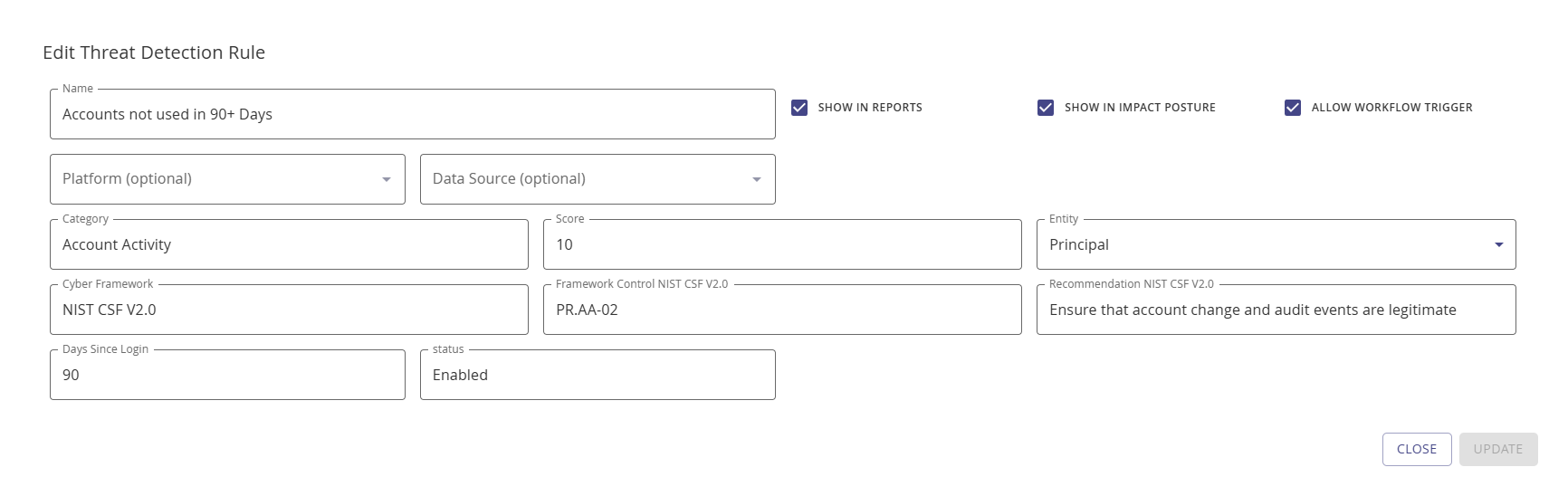
To activate threat detection workflows, enable the Allow Workflow Trigger checkbox on the threat detection rule configuration modal.
Threat Resolved
Event: hydn://threatalert/threat-resolved
Fired when a previously detected threat no longer meets the threat rule criteria.
Available Variables: Same as Threat Detected (see above)
Use Cases:
- Close ServiceNow incidents automatically
- Send resolution notifications to security teams
- Update external risk dashboards
- Trigger compliance reporting workflows
Classification Triggers
Classification Added
Event: hydn://classificationalert/classification-added
Fired when a classification rule applies a tag to an account.
Available Variables:
| Variable | Description | Example Value |
|---|---|---|
{Title} | Event title | "Classification Added" |
{ClassificationID} | Unique classification rule ID | "auto-vault-privileged" |
{ClassificationRule} | Classification rule name | "Auto Vault Privileged Accounts" |
{Classification} | Classification tag | "Add to CyberArk" |
{JobTime} | Classification timestamp | "2024-01-15T11:00:00Z" |
{Platform} | Platform type | "Linux", "Windows" |
{Name} | Primary account name | "root" |
{Site} | Site identifier | "prod-servers" |
{Status} | Classification status | "added" |
Plus all identity and entity fields from Threat Detection (Ids, Names, Accounts, Score, etc.)
Workflow Filtering:
Classification workflows can be filtered to specific classification rules:
- Filter Option:
classificationid - Filter Value: The classification rule identifier (e.g.,
auto-vault-privileged)
Use Cases:
- Auto-vaulting: Automatically onboard accounts to PAM systems when classified
- Compliance workflows: Notify compliance teams when sensitive accounts are identified
- Access reviews: Create access certification campaigns for classified accounts
- Tagging: Update external CMDBs with classification tags
Classification Removed
Event: hydn://classificationalert/classification-removed
Fired when a classification tag is removed from an account.
Available Variables: Same as Classification Added (see above)
Use Cases:
- Remove accounts from PAM vaults when no longer privileged
- Close compliance workflows for reclassified accounts
- Update external systems when tags change
NOTE
For classification-triggered workflows like auto-vaulting, verify that the classification rule has the Allow Workflow Trigger option enabled under Configuration > Identify > Classification Rules.
Entity Alert Triggers
Entity Alert
Event: hydn://entityalert/entity-alert
Fired when entities (accounts, groups, owners) are created, updated, or deleted.
Available Variables:
| Variable | Description | Example Value |
|---|---|---|
{Title} | Event title | "Entity Alert" |
{EntityID} | Unique entity identifier | "entity-uuid" |
{EntityType} | Type of entity | "account", "group", "owner" |
{JobTime} | Event timestamp | "2024-01-15T12:00:00Z" |
{UpdateType} | Type of change | "Create", "Update", "Delete" |
{Platform} | Platform type | "Active Directory", "AWS" |
{Name} | Entity name | "new_admin_account" |
{Site} | Site identifier | "corp.example.com" |
{Status} | Entity status | "active", "disabled" |
Plus all standard identity and entity fields
Workflow Filtering:
Entity alert workflows support two filter options:
- Filter Option:
entityid- Filter by specific entity identifier - Filter Option:
entityalerttype- Filter by update type (Create, Update, Delete)
Use Cases:
- Account lifecycle: Track privileged account creation and deletion
- Compliance monitoring: Alert when high-risk accounts are modified
- CMDB synchronization: Update external CMDBs when entities change
- Audit logging: Send entity change events to SIEM or log aggregation systems
Variable Formatting Details
List Variables
Some triggers provide both array and formatted versions of lists:
- Array format (ends with
List):{IdsList}→["id1", "id2", "id3"]- Use for JSON webhooks - Comma-separated (no suffix):
{Ids}→"id1", "id2", "id3"- Use for email bodies and tickets - Printable format:
{PrintableIds}→ Friendly formatted string - Use for human-readable displays
Time Values
Timestamp variables ({JobTime}, {LastRun}, {NextRun}) are provided in ISO 8601 format:
- Format:
YYYY-MM-DDTHH:MM:SSZ - Example:
2024-01-15T10:30:00Z - Timezone: UTC
Numeric Values
Numeric variables like {Score} and {JobTime} are provided as strings but can be used in numeric contexts:
{Score}- Threat risk score (0-100){JobTime}- Duration in seconds
Template Rendering
Hydden Discovery uses a two-pass template rendering system:
- First pass: Converts
{Variable}syntax to Go template syntax{{.Variable}} - Second pass: Executes template with event data, substituting actual values
This supports:
- Simple substitution:
{Name}→ actual name - Nested fields:
{Collector.Name}→ collector name from nested object - Conditional logic (advanced): Native Go template syntax
{{if .Enabled}}...{{end}}
Troubleshooting
| Issue | Solution |
|---|---|
| Variable not substituting | Verify variable name matches available variables for trigger type, ensure syntax uses {Variable} format |
| Empty variable value | Variable may not be populated for this event type (e.g., {JobError} only populated for failed events) |
| Trigger not firing | Verify workflow is enabled, check that event conditions are met, ensure threat/classification rules have "Allow Workflow Trigger" enabled |
| Wrong variable values | Check template syntax, verify variable references the correct field, review event data in logs |
Scheduled Report Triggers
Scheduled Report
Event: hydn://scheduled-report
NOTE
Scheduled Reports is a beta feature. Behavior may change in future releases.
Fired when a saved search report runs on a defined schedule. Use this trigger to send report results by email, create tickets, or push data to external systems on a recurring basis.
Available Variables:
| Variable | Description | Example Value |
|---|---|---|
{Title} | Report event title | "Scheduled Report" |
{SavedSearchID} | ID of the saved search | "1gbrYrq61lu5dymofZGYu8ACOTT" |
{Name} | Name of the saved search | "Dormant Admin Accounts" |
{Site} | Site identifier | "corp-us-east-1" |
{Status} | Report status | "success" |
{Id} | Primary result entity ID | "uuid-..." |
{Names} | Comma-separated result names | "admin1", "admin2" |
{Ids} | Comma-separated result IDs | "id1", "id2" |
{Accounts} | Comma-separated account names | "svc_admin", "local_admin" |
{DisabledAccounts} | Comma-separated disabled accounts | "old_svc" |
{PrintableIds} | Formatted ID string | "IDs: id1, id2" |
{PrintableNames} | Formatted names string | "Names: admin1, admin2" |
{Approved} | Approval status | "false" |
Workflow Filtering:
Scheduled Report workflows can be filtered to run only for specific saved searches:
- Filter Option:
savedsearchids - Filter Value: Comma-separated saved search IDs (e.g.,
1gbrYrq61lu5dymofZGYu8ACOTT,GcN0B8yAZVqXi3SvOjLVeL581I8)
If no filter is set, the workflow fires for every scheduled report run.
Use Cases:
- Email recurring identity risk reports to security managers
- Create weekly ServiceNow tickets for dormant privileged accounts
- Push scheduled report results to a SIEM via webhook
- Trigger access review notifications based on report findings
Configuration:
To use Scheduled Report triggers:
- Create or edit a saved search in Global Search
- Assign a schedule to the saved search using the Schedule dropdown
- Create a workflow with the Scheduled Report trigger type
- Optionally filter the workflow to specific saved search IDs
Related Topics
- Overview - Automation architecture and concepts
- Workflows - Creating and managing workflows
- Providers - Configuring action providers
- Threat Detection Rules - Configuring threat detection
- Classification Rules - Account classification configuration