
Insights and Recommendations
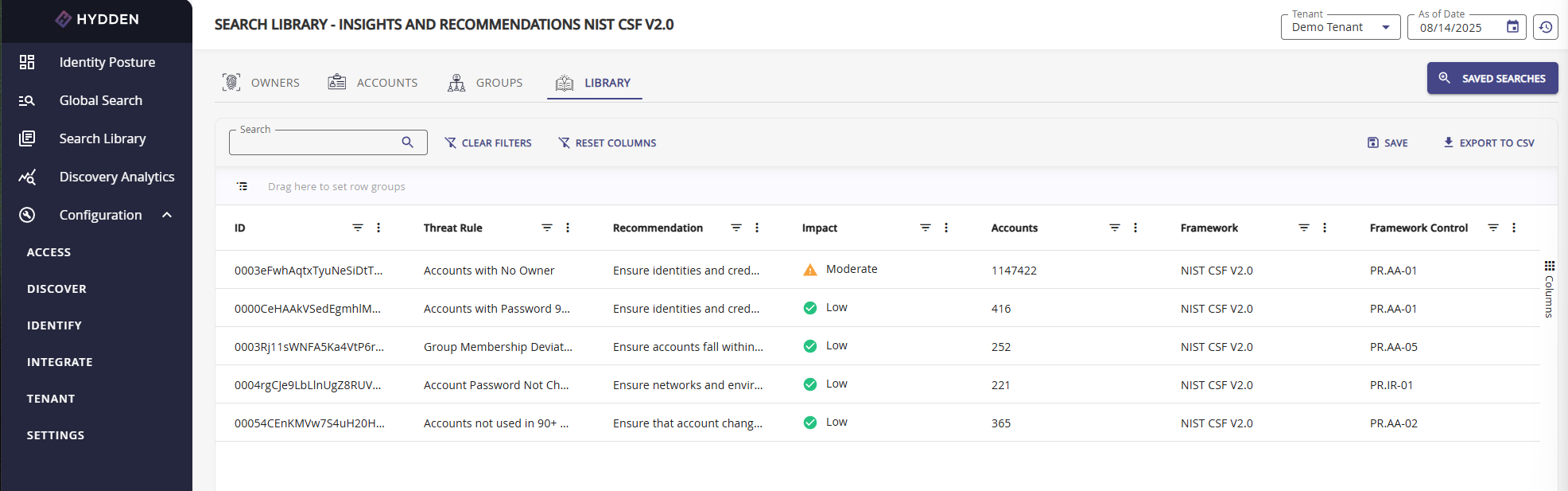
The Insights and Recommendations report provides actionable security guidance by mapping your organization's threat detection findings to established cybersecurity frameworks. This report helps prioritize remediation efforts by showing which threat rules contribute most to your overall threat score and aligning them with industry-standard framework controls.
Overview
Insights and Recommendations bridge the gap between threat detection results and actionable security improvements. The report analyzes your organization's threat scores and correlates them with specific controls from major cybersecurity frameworks (NIST CSF v2.0, CIS v8, CRI Tier 4 v2), providing recommendations based on framework best practices.
Key Benefits:
- Framework Alignment: Map detected threats to specific controls in NIST, CIS, and CRI frameworks
- Prioritized Remediation: Identify which threat rules have the highest impact on your overall identity posture
- Compliance Support: Generate evidence for framework compliance and maturity assessments
- Actionable Recommendations: Get specific guidance for each threat rule based on framework controls
- Impact Analysis: Understand how addressing specific threats will improve your overall security posture
Visual Integration: The Insights and Recommendations report is also visualized on the Insights and Recommendations page, accessible via click-through from the main Threat Score widget on the Identity Posture Dashboard.
Accessing the Insights and Recommendations Report
From Search Library
Navigate to Search Library in the main navigation
Locate the Owners & Accounts tile
Select Insights and Recommendations
From Identity Posture Dashboard
- Navigate to Identity Posture dashboard
- Click the Threat Score widget
- Select View Insights and Recommendations
Supported Cybersecurity Frameworks
The report supports three variants, each aligned with a different cybersecurity framework:
NIST CSF v2.0 (Default)
NIST Cybersecurity Framework version 2.0 - Comprehensive framework organized around six core functions: Identify, Protect, Detect, Respond, Recover, and Govern.
Use Cases:
- General cybersecurity program alignment
- Federal compliance requirements (FISMA, FedRAMP)
- Broad industry applicability
Framework Structure:
- Function codes (e.g., PR.AA-01, PR.IR-01)
- Identity and access management controls
- Incident response guidance
CIS v8
CIS Controls version 8 - Prioritized set of 18 critical security controls developed by the Center for Internet Security.
Use Cases:
- Implementation-focused security programs
- Small to medium organization security baselines
- Practical, action-oriented guidance
Framework Structure:
- Numbered controls (e.g., Control 5: Account Management, Control 6: Access Control Management)
- Sub-control specifications
- Implementation groups (IG1, IG2, IG3)
CRI Tier 4 v2
Cyber Resilience Institute Tier 4 version 2 - Framework focused on cyber resilience and operational continuity.
Use Cases:
- Resilience-focused organizations
- Operational technology (OT) environments
- Business continuity planning integration
Framework Structure:
- Tiered maturity model
- Resilience-specific controls
- Recovery-oriented guidance
Report Columns
The Insights and Recommendations report includes the following columns:
| Column | Description | Example Values |
|---|---|---|
| Threat Rule | The threat detection rule that triggered findings | "Accounts with Password 180+ Days", "Highly Privileged Group(s)" |
| Recommendation | Framework-derived action to address the threat | "Ensure identities and credentials are managed by the organization" |
| Impact | Calculated percentage impact on overall threat score | 15.2%, 8.7%, 3.1% |
| Accounts | Number of accounts matching this threat rule | 45, 128, 7 |
| Framework | The cybersecurity framework providing the recommendation | NIST CSF V2.0, CIS V8, CRI TIER4 V2 |
| Framework Control | Specific control reference from the framework | PR.AA-01, Control 5.1, R-3.2 |
Understanding Impact
Impact Calculation: The Impact percentage represents how much this specific threat rule contributes to your organization's overall threat score. It is calculated based on:
- The severity/score assigned to the threat rule
- The number of accounts affected
- The rule's weighting in the overall threat model
Impact Interpretation:
- High Impact (>10%): Critical remediation priority - addressing this threat significantly improves posture
- Medium Impact (5-10%): Important remediation target - meaningful impact on overall score
- Low Impact (<5%): Lower priority - limited effect on overall threat score
Strategic Use: Sort by Impact (highest first) to identify the most effective remediation efforts. Addressing high-impact threats provides the greatest improvement in your overall identity security posture.
Filtering and Customization
Report Filters
The Insights and Recommendations report supports several filters to refine and target your analysis:
Cyber Security Framework
Filter to view recommendations from a specific framework:
- NIST CSF V2.0 - Default, comprehensive cybersecurity framework
- CIS V8 - Implementation-focused security controls
- CRI TIER4 V2 - Resilience-focused framework
Use Case: Select the framework that aligns with your organization's compliance or maturity goals.
Framework Control
Filter to view only threats mapped to a specific framework control.
Use Case:
- Prepare evidence for specific control audits
- Focus remediation on specific framework sections
- Analyze coverage for particular control areas
Example: Filter to "PR.AA-01" to see all threats related to identity and credential management.
Min Impact / Max Impact
Specify the minimum and/or maximum impact percentage to create a focused range.
Use Cases:
- High Impact Focus: Set Min Impact to 10% to see only critical remediation targets
- Quick Wins: Set Max Impact to 5% to identify lower-effort improvements
- Medium Priority: Set Min Impact 5% and Max Impact 10% for medium-priority items
Example: Min Impact = 10% shows only threats contributing more than 10% to your overall threat score.
Min Accounts / Max Accounts
Specify the minimum and/or maximum number of affected accounts.
Use Cases:
- Large-Scale Issues: Set Min Accounts to 50 to focus on widespread problems
- Manageable Tasks: Set Max Accounts to 10 to identify small, easily addressed issues
- Prioritization Strategy: Use Max Accounts for quick remediation wins (fewer affected accounts)
Example:
- Set Min Accounts to 0 and Max Accounts to 5 for breached accounts (immediate attention even for one account)
- Set Min Accounts to 100 to identify systemic issues affecting many users
Combining Filters
Filters can be combined for targeted analysis:
Example Combinations:
- Quick Wins: Max Impact 5% + Max Accounts 10 = Small, low-effort remediation tasks
- Critical Issues: Min Impact 10% + Min Accounts 50 = Widespread, high-impact threats
- Framework Audit: Framework Control "PR.AA-05" + Min Impact 5% = Significant privilege-related issues
Common Workflows
Compliance Reporting
Generate framework-aligned compliance evidence:
- Open Insights and Recommendations report
- Select the relevant Cyber Security Framework (e.g., NIST CSF V2.0)
- Filter by specific Framework Control if targeting particular controls
- Sort by Impact (descending) to show most significant findings
- Export CSV for compliance documentation
- Include in framework maturity assessments or gap analysis
Prioritized Remediation Campaign
Identify and address highest-impact threats:
- Open Insights and Recommendations report
- Sort by Impact (highest first)
- Set Min Impact to 10% to focus on critical items
- Review the top 5-10 threat rules
- For each rule:
- Review Accounts count to understand scope
- Read Recommendation for remediation guidance
- Click through to threat rule details for affected accounts
- Create remediation tasks in order of impact
Small Task Remediation
Address quick wins with minimal effort:
- Open Insights and Recommendations report
- Set Max Accounts to 10 to identify small-scope issues
- Set Min Impact to 5% to ensure meaningful improvement
- Sort by Accounts (ascending)
- Address smallest tasks first for rapid progress
- Monitor threat score improvement over time
Framework Gap Analysis
Assess coverage for specific framework areas:
- Open Insights and Recommendations report
- Select relevant Cyber Security Framework
- Filter by Framework Control (e.g., PR.AA-05 for least privilege)
- Review all threats mapped to that control
- Compare with framework requirements
- Identify gaps where framework controls have no corresponding threats detected
- Consider creating custom threat rules for missing controls
Breach Response Prioritization
Focus on credential-related threats after a breach:
- Open Insights and Recommendations report
- Filter for breached account-related threat rules
- Set Min Accounts to 0 (every breached account matters)
- Review Impact to understand overall exposure
- Address high-impact credential threats first
- Use Framework Control references for remediation best practices
Exporting and Sharing
CSV Export
Export the report for offline analysis, documentation, or integration:
- Apply desired filters to narrow results
- Click Export CSV button
- CSV includes all visible columns with current filters applied
- Compatible with Excel, Google Sheets, and analytics tools
Export Use Cases:
- Compliance evidence packages
- Executive reporting and presentations
- Remediation project planning
- Integration with ticketing systems
- Trend analysis over time (export monthly snapshots)
Saving Custom Views
Save frequently-used filter combinations as saved searches:
- Apply filters to create your desired view
- Click Save Search (if available)
- Name the search descriptively (e.g., "High Impact NIST Controls")
- Access saved searches from Global Search > Saved Searches
Integration with Threat Detection
The Insights and Recommendations report depends on properly configured threat detection rules.
Threat Rule Configuration
Each threat rule includes framework alignment metadata:
- Framework: Which cybersecurity framework (NIST, CIS, CRI)
- Function/Control: Specific framework control reference
- Recommendation: Framework-derived guidance
- Category: Threat category (Privilege, Password & Security, Breach Data, etc.)
View Threat Rules: Navigate to Configure > Identify > Threat Detection to view and customize threat rules.
Custom Threat Rules
Create custom threat rules to extend framework coverage:
- Navigate to Configure > Identify > Threat Detection
- Click Create Threat Rule
- Configure detection logic
- Assign Framework alignment (NIST CSF V2.0, CIS V8, or CRI TIER4 V2)
- Specify Framework Control reference
- Provide Recommendation text
- Custom rules appear in Insights and Recommendations report
Benefits:
- Align organization-specific threats with frameworks
- Fill gaps in default framework coverage
- Tailor recommendations to your environment
Threat Rule Impact
Threat rule configuration directly affects Insights and Recommendations:
- Score: Higher scores increase Impact percentage
- Affected Accounts: More matches increase Impact
- ShowInImpact: Rules with this disabled don't appear in Insights
- Framework Alignment: Determines which framework variant includes the rule
Best Practices
Effective Use of Insights
- Regular Review: Review Insights and Recommendations weekly or monthly to track remediation progress
- Framework Selection: Choose the framework that aligns with your compliance requirements
- Prioritize by Impact: Start with highest-impact threats for maximum improvement
- Combine Strategies: Mix high-impact and low-account-count tasks for balanced progress
- Track Trends: Export monthly snapshots to track improvement over time
- Align with Compliance: Use framework controls to guide audit preparation
Remediation Strategy
- Assess Scope: Review Impact and Accounts to understand effort required
- Read Recommendations: Use framework guidance to understand proper remediation
- Create Tasks: Generate remediation tickets linked to framework controls
- Monitor Progress: Track threat score changes as remediation progresses
- Document Evidence: Save exports as compliance evidence
- Iterate: Regularly reassess as new data is collected
Common Pitfalls
- Ignoring Low-Account Threats: Even a single breached privileged account is critical
- Impact-Only Focus: Consider both impact and feasibility (account count) for balanced progress
- Framework Mismatch: Ensure your selected framework aligns with actual compliance requirements
- Static Analysis: Threat scores change as data is collected - review regularly
- Missing Context: Click through to threat rule details to understand root causes
Troubleshooting
| Issue | Solution |
|---|---|
| No data displayed | Verify threat detection rules are enabled and data collection has run |
| Impact percentages seem incorrect | Check threat rule scores and affected account counts - recalculate if rules changed |
| Missing framework controls | Some threat rules may not have framework alignment - add custom rules if needed |
| Export includes too many rows | Apply filters before exporting to narrow results |
| Framework filter has no effect | Ensure threat rules are configured with framework metadata |
| Accounts count doesn't match threat rule query | Run the underlying threat rule query directly to verify affected accounts |
Related Topics
- Insights and Recommendations Page - Visual dashboard for insights
- Threat Detection Overview - Understanding threat detection
- Default Threat Rules - Built-in threat detection rules
- Creating Custom Threat Rules - Extend framework coverage
- Account Threat Scores - Individual account threat analysis
- Owner Threat Scores - Identity-level threat analysis
- Search Library Overview - All available reports