
Classification Rules
What Classification Rules Do
Classification rules automatically tag discovered accounts with labels (e.g., Admin Account, Service Account, Suspicious Account) based on account attributes. Classifications are used throughout Hydden to filter reports, scope mapping rules, and drive threat detection. Each classification rule defines a query field, operator, and value to match against account data.
On the Classification Rules page, tenant owners can create and edit Account Classifications and Classification Rules.
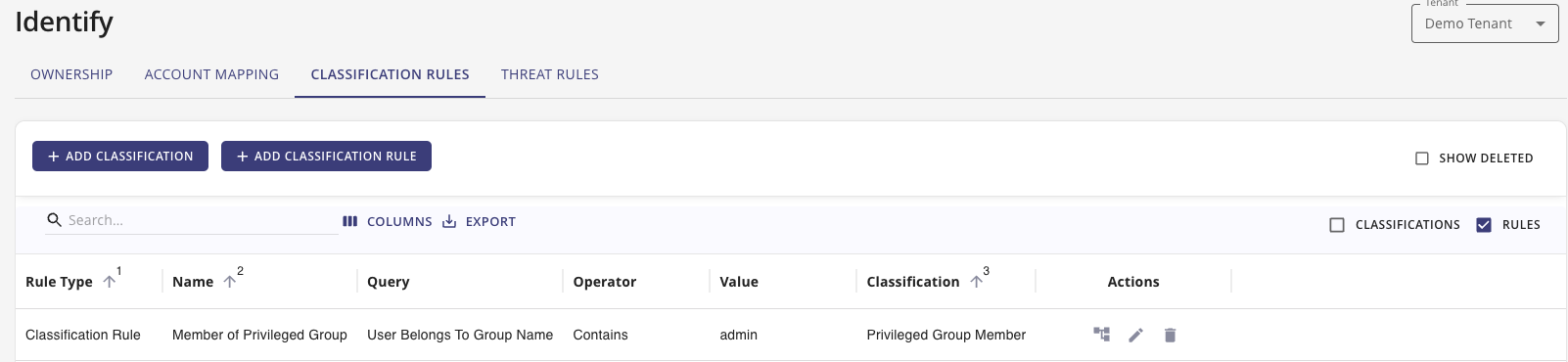
The page provides two configuration workflows. One to setup Classifications and the other to define Classification Rules.
Add Classification
Hydden provides the following default classifications:
- Admin Account
- Custom Account
- CVE-based classifications:
- CVE-2023-42793
- CVE-2024-37085
- Known Bad Account
- Privileged Account
- Service Account
- Suspicious Account
Use the + Add Classification button to add your own classifications.
CVE Classifications
CVE-Based Detection
Hydden includes built-in classifications for known CVE vulnerabilities:
- CVE-2023-42793 — JetBrains TeamCity authentication bypass. The KRTBGT-based classification rules identify Active Directory accounts with naming patterns associated with this exploit.
- CVE-2024-37085 — VMware ESXi Active Directory integration vulnerability. The VMware vSphere Admin classification rules detect admin accounts in environments that may be affected.
These classifications pair with corresponding classification rules to automatically flag at-risk accounts.
Add Classification Rules
By default, Hydden provides the following Classification rules:
- Accounts by Display Name
- Accounts by Email
- Accounts by Name
- Accounts by UPN
- Member of Privileged Group
- Service Account by Path/OU
- Service Account by Type
- Active Directory Accounts with a name of KRTBGT
- Active Directory Accounts with a name of KRTBGT (CVE)
- Privileged Account
- VMware vSphere Admin Accounts
- VMware vSphere Admin Accounts (CVE)
Use the + Add Classification Rule button to add your own classification rules. Use the Edit button to edit existing rules. Use the Rule Matches button to view data that is matching the specific rule.
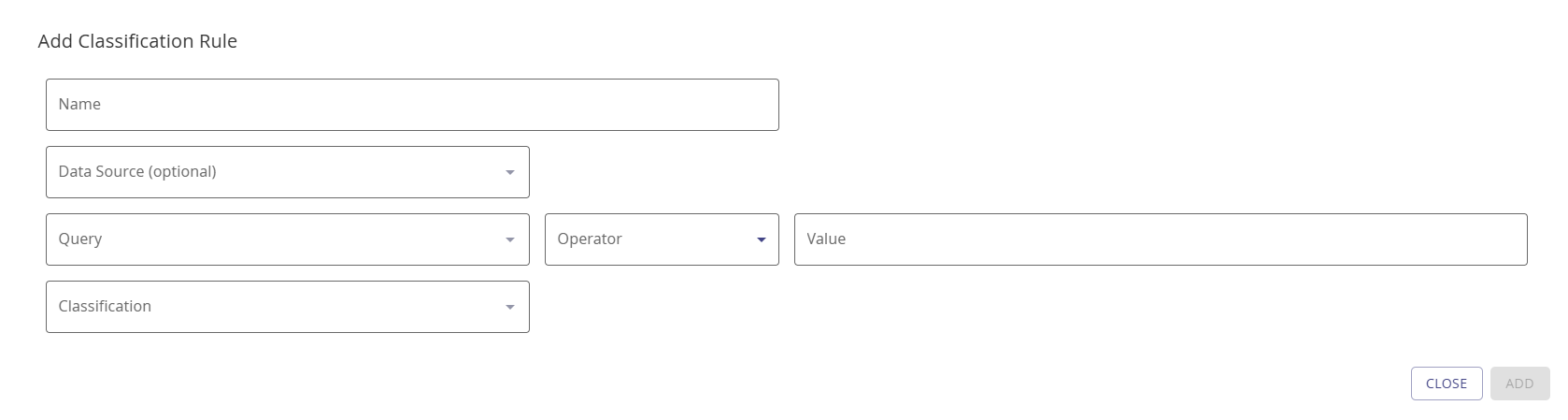
Purpose: Create a custom classification rule to automatically tag accounts based on their attributes.
- Give your rule a Name.
- Optionally from the Data Source drop-down, select a data source this rule should apply to.
- From the Query field, select which query to use for this rule. See Available Query Fields for the full list.
- From the Operator field, select Contains, Starts with, Ends with, or Equals.
- In the Value field, enter which value, prefix, suffix, or term to match.
- From the Classification field, select the classification for this rule.
- Click Add.
Available Query Fields
The following fields are available for use in classification rule queries:
| Query Field | Description |
|---|---|
| Path | The account's organizational unit or directory path |
| Name | The account's name (sAMAccountName or equivalent) |
| Type | The account type (User, Service, Resource, etc.) |
| Display Name | The account's display name |
| UPN | The account's User Principal Name |
| The account's primary email address | |
| Title | The account holder's job title |
| Department | The account holder's department |
| IsPrivileged | Whether the account has privileged access (true/false) |
| Custom1–Custom10 | Custom attribute fields 1 through 10 |
| Employee ID | The account holder's employee identifier |
| Group Name | The name of a group the account belongs to |
Rule Flags
Classification rules support the following optional flags:
| Flag | Description |
|---|---|
| Is Alert | When enabled, the rule triggers an alert notification when a matching account is found |
| Is Repeatable | When enabled, the rule can trigger multiple times for the same account across collection runs |
| Allow Workflow Trigger | When enabled, the rule can initiate automated workflows configured in the Integrate section |
Account Classification Report
The Classification Rules come with an out of the box report in the Search Library on the Identity & Account tile:
- Account Classifications
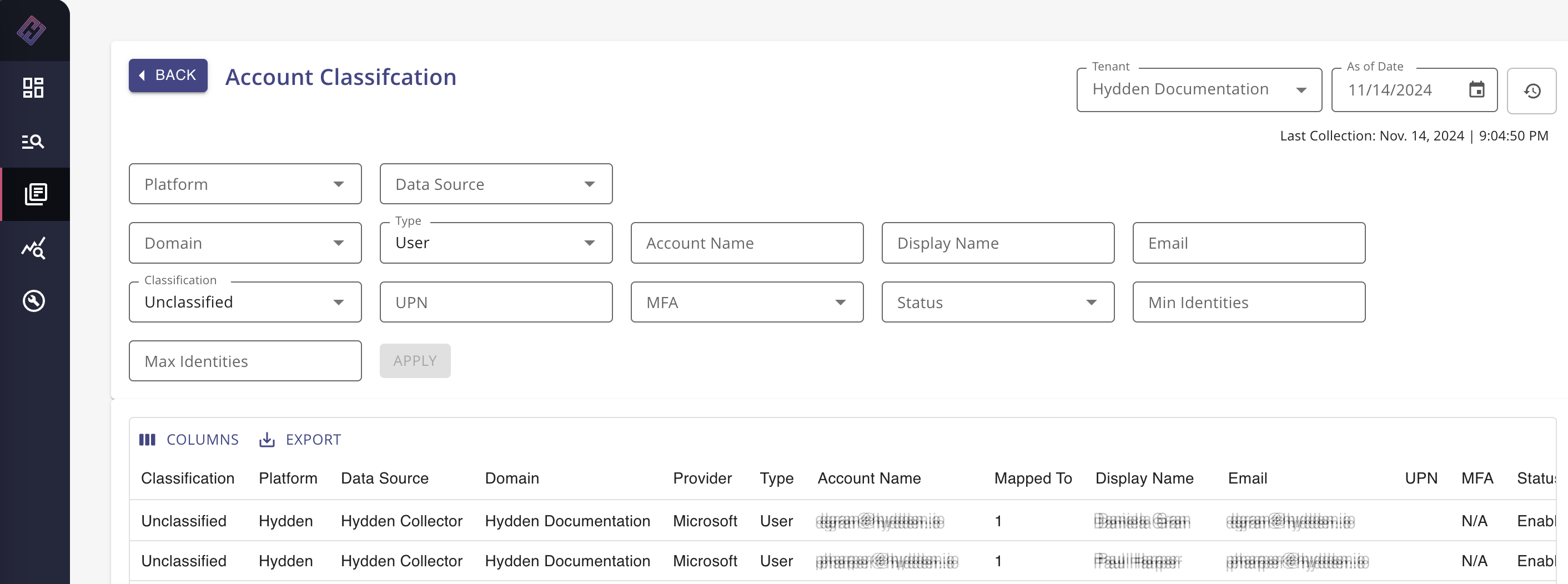
The Account Classification Report in the Search Library shows the following columns by default:
- Classification
- Classification Rule
- Platform
- Data Source
- Domain
- Provider
- Type
- Account Name
- Mapped to
- Display Name
- UPN
- MFA
- Status
The Path column, which can be added via the Columns button, provides visibility into Path/OU value details required to set up a custom Path/OU classification.